GR LearnPro– Simplifying Classroom and Group Management.

The Groups/Classes feature in GR LearnPro allows educators to efficiently create and manage instructional groups, ensuring students are organized based on courses, grades, or custom learning needs.
Class: A class is best suited for a single course that includes students from multiple grades. It is ideal for subjects where students from different grade levels can learn together under one structured curriculum.
Group: A group is designed for multiple courses and multiple grades within a single organized structure. It is useful for specialized programs, tutoring groups, or extracurricular learning that spans different subjects and grade levels.
Accessing the Groups/Classes Page
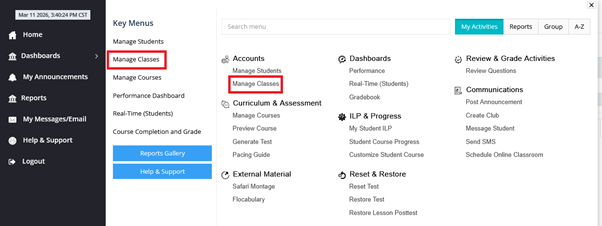
To create a new group or class:
Creating a New Group/Class
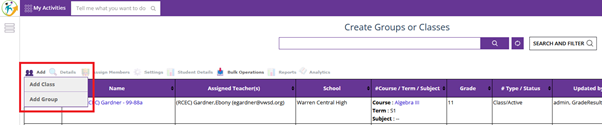
To add a new group or class:
1. Click the “Add Group” or “Add Class” button at the top left of the page.
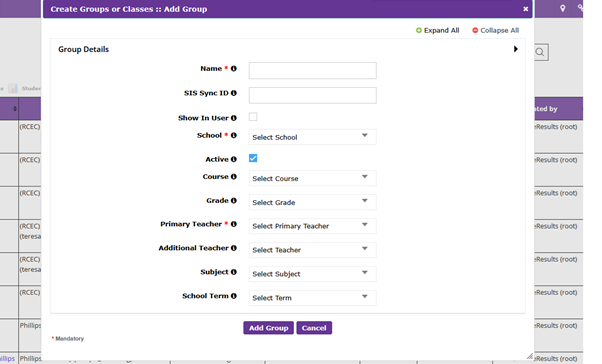
2. Fill in the required fields (marked with a red star *):
3. After filling in the necessary information, click “Add” to save the new group/class.
Managing Existing Groups/Classes
Once created, users can:
This feature helps schools efficiently organize students and manage instructional groups effectively.
Assign Members
The Assign Members option allows you to manage users within a class or group by adding or removing students and teachers, as well as enrolling students in courses.
Available Options
Add Student
- Add one or more students to the selected class or group.
Add Primary Teachers
- Assign primary teachers responsible for managing the class or group.
- Primary teachers typically have full access to monitor and manage student progress.
Add Additional Teachers
- Add supporting teachers to the class or group.
- These teachers may assist with instruction, grading, or monitoring, based on permissions.
Remove Students
- Remove students from the class or group when they are no longer required to be enrolled.
Enroll Student Course
- Assign courses to students within the class or group.
- This ensures students have access to the required learning content.
Tips
Ensure students are added before assigning courses.
If a class is intended for specific grade levels, double-check selections before adding.
Assign at least one Primary Teacher for proper class management.
Use Additional Teachers for co-teaching or support roles.
Narrow down classes/groups quickly by using the search fields on the Groups/Classes page.
Keeping class details updated ensures better organization and tracking.
Was this article helpful?
That’s Great!
Thank you for your feedback
Sorry! We couldn't be helpful
Thank you for your feedback
Feedback sent
We appreciate your effort and will try to fix the article